
CMS Open Data \(t\bar{t}\): from data delivery to statistical inference#
We are using 2015 CMS Open Data in this demonstration to showcase an analysis pipeline. It features data delivery and processing, histogram construction and visualization, as well as statistical inference.
This notebook was developed in the context of the IRIS-HEP AGC tools 2022 workshop. This work was supported by the U.S. National Science Foundation (NSF) Cooperative Agreement OAC-1836650 (IRIS-HEP).
This is a technical demonstration. We are including the relevant workflow aspects that physicists need in their work, but we are not focusing on making every piece of the demonstration physically meaningful. This concerns in particular systematic uncertainties: we capture the workflow, but the actual implementations are more complex in practice. If you are interested in the physics side of analyzing top pair production, check out the latest results from ATLAS and CMS! If you would like to see more technical demonstrations, also check out an ATLAS Open Data example demonstrated previously.
This notebook implements most of the analysis pipeline shown in the following picture, using the tools also mentioned there: 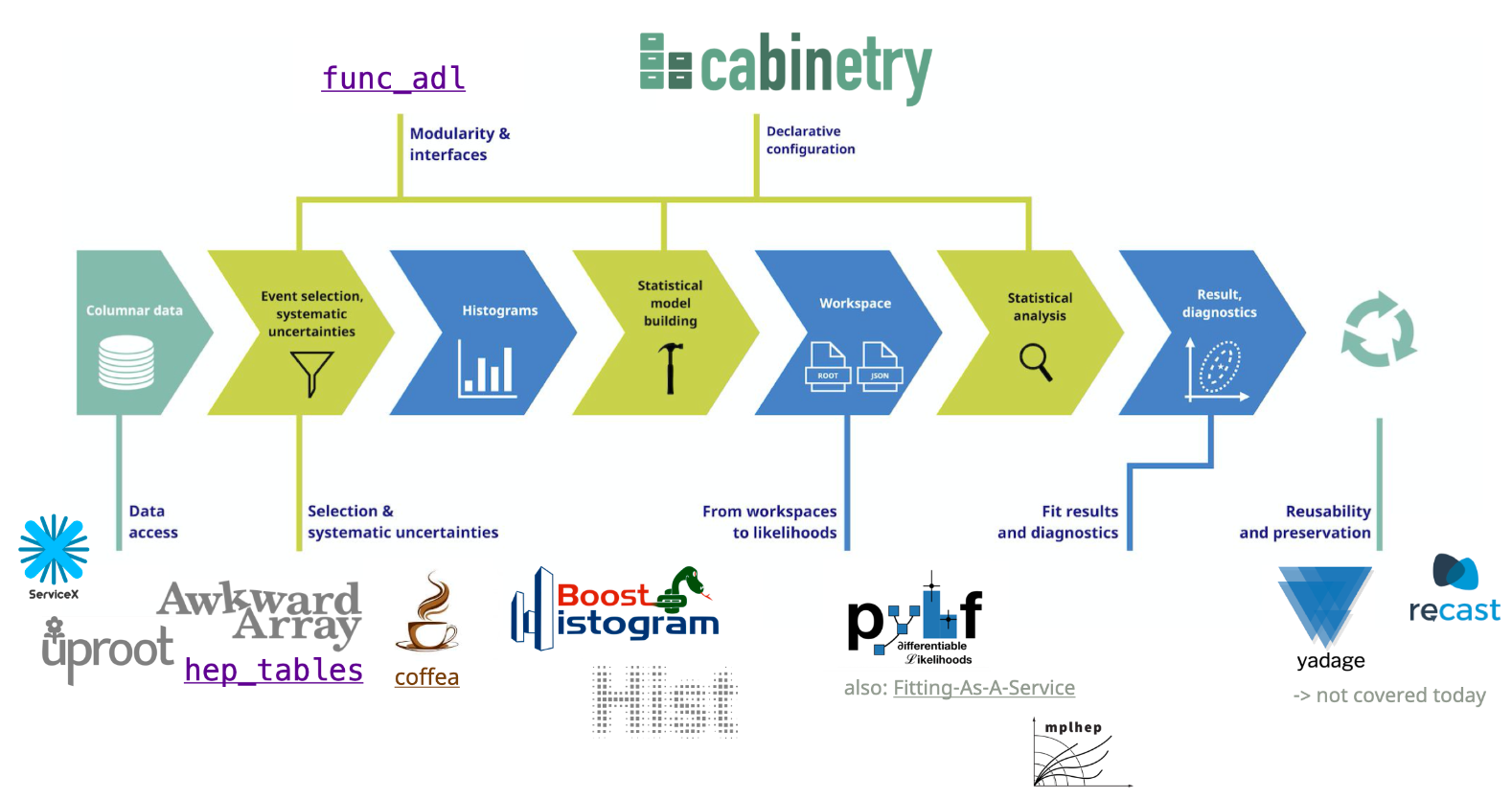
Data pipelines#
There are two possible pipelines: one with ServiceX enabled, and one using only coffea for processing. 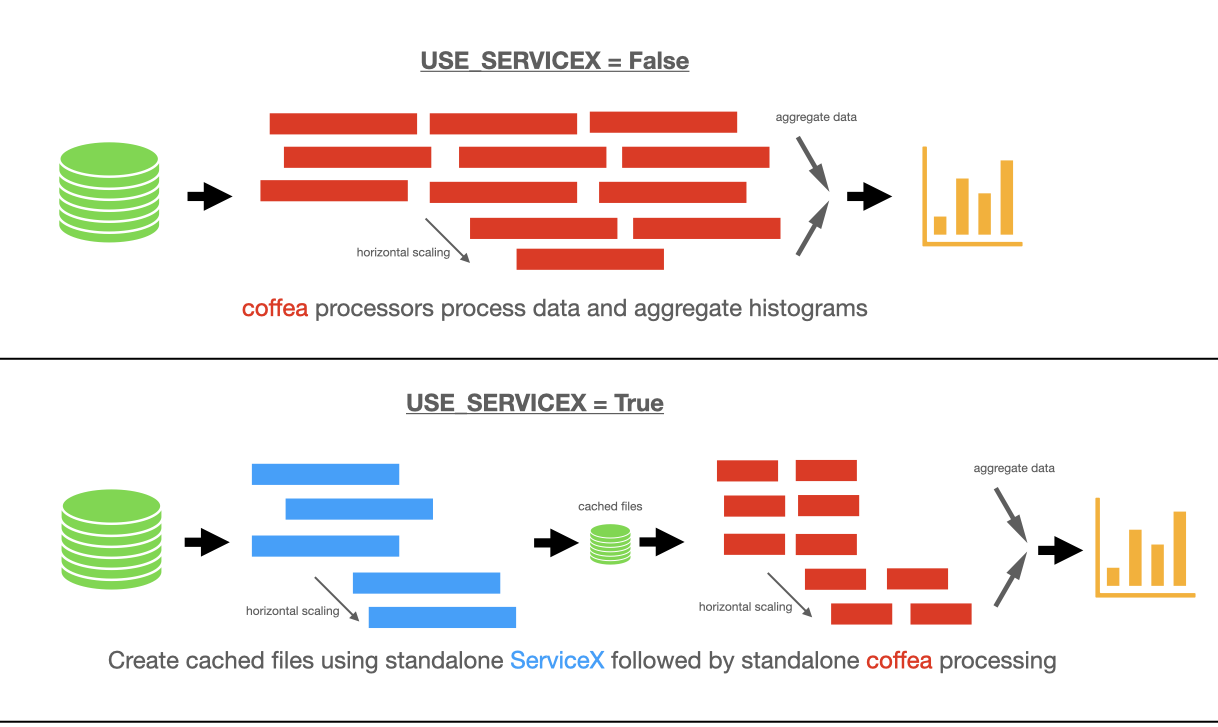
Imports: setting up our environment#
[1]:
import asyncio
import logging
import os
import time

import awkward as ak
import cabinetry
from coffea import processor
from coffea.nanoevents import NanoAODSchema

from func_adl import ObjectStream
from func_adl_servicex import ServiceXSourceUpROOT

import hist
import json
import yaml
import matplotlib.pyplot as plt
import numpy as np
import uproot

import utils  # contains code for bookkeeping and cosmetics, as well as some boilerplate

logging.getLogger("cabinetry").setLevel(logging.INFO)
Configuration: number of files and data delivery path#
The number of files per sample set here determines the size of the dataset we are processing. There are 9 samples being used here, all part of the 2015 CMS Open Data release.
These samples were originally published in miniAOD format, but for the purposes of this demonstration were pre-converted into nanoAOD format. More details about the inputs can be found here.
The table below summarizes the amount of data processed depending on the N_FILES_MAX_PER_SAMPLE setting.
setting |
number of files |
total size |
number of events |
|---|---|---|---|
|
9 |
22.9 GB |
10455719 |
|
18 |
42.8 GB |
19497435 |
|
43 |
105 GB |
47996231 |
|
79 |
200 GB |
90546458 |
|
140 |
359 GB |
163123242 |
|
255 |
631 GB |
297247463 |
|
395 |
960 GB |
470397795 |
|
595 |
1.40 TB |
705273291 |
|
787 |
1.78 TB |
940160174 |
The input files are all in the 1–3 GB range.
[2]:
### GLOBAL CONFIGURATION
# input files per process, set to e.g. 10 (smaller number = faster)
N_FILES_MAX_PER_SAMPLE = 5

# enable Dask
USE_DASK = True

# enable ServiceX
USE_SERVICEX = False

### LOAD OTHER CONFIGURATION VARIABLES
with open("config.yaml") as config_file:
    config = yaml.safe_load(config_file)
Defining our coffea Processor#
The processor includes a lot of the physics analysis details: - event filtering and the calculation of observables, - event weighting, - calculating systematic uncertainties at the event and object level, - filling all the information into histograms that get aggregated and ultimately returned to us by coffea.
[3]:
# functions creating systematic variations
def flat_variation(ones):
    # 2.5% weight variations
    return (1.0 + np.array([0.025, -0.025], dtype=np.float32)) * ones[:, None]


def btag_weight_variation(i_jet, jet_pt):
    # weight variation depending on i-th jet pT (7.5% as default value, multiplied by i-th jet pT / 50 GeV)
    return 1 + np.array([0.075, -0.075]) * (ak.singletons(jet_pt[:, i_jet]) / 50).to_numpy()


def jet_pt_resolution(pt):
    # normal distribution with 5% variations, shape matches jets
    counts = ak.num(pt)
    pt_flat = ak.flatten(pt)
    resolution_variation = np.random.normal(np.ones_like(pt_flat), 0.05)
    return ak.unflatten(resolution_variation, counts)


class TtbarAnalysis(processor.ProcessorABC):
    def __init__(self, disable_processing, io_branches):
        num_bins = 25
        bin_low = 50
        bin_high = 550
        name = "observable"
        label = "observable [GeV]"
        self.hist = (
            hist.Hist.new.Reg(num_bins, bin_low, bin_high, name=name, label=label)
            .StrCat(["4j1b", "4j2b"], name="region", label="Region")
            .StrCat([], name="process", label="Process", growth=True)
            .StrCat([], name="variation", label="Systematic variation", growth=True)
            .Weight()
        )
        self.disable_processing = disable_processing
        self.io_branches = io_branches

    def only_do_IO(self, events):
            for branch in self.io_branches:
                if "_" in branch:
                    split = branch.split("_")
                    object_type = split[0]
                    property_name = '_'.join(split[1:])
                    ak.materialized(events[object_type][property_name])
                else:
                    ak.materialized(events[branch])
            return {"hist": {}}

    def process(self, events):
        if self.disable_processing:
            # IO testing with no subsequent processing
            return self.only_do_IO(events)

        histogram = self.hist.copy()

        process = events.metadata["process"]  # "ttbar" etc.
        variation = events.metadata["variation"]  # "nominal" etc.

        # normalization for MC
        x_sec = events.metadata["xsec"]
        nevts_total = events.metadata["nevts"]
        lumi = 3378 # /pb
        if process != "data":
            xsec_weight = x_sec * lumi / nevts_total
        else:
            xsec_weight = 1

        #### systematics
        # example of a simple flat weight variation, using the coffea nanoevents systematics feature
        if process == "wjets":
            events.add_systematic("scale_var", "UpDownSystematic", "weight", flat_variation)

        # jet energy scale / resolution systematics
        # need to adjust schema to instead use coffea add_systematic feature, especially for ServiceX
        # cannot attach pT variations to events.jet, so attach to events directly
        # and subsequently scale pT by these scale factors
        events["pt_nominal"] = 1.0
        events["pt_scale_up"] = 1.03
        events["pt_res_up"] = jet_pt_resolution(events.Jet.pt)

        pt_variations = ["pt_nominal", "pt_scale_up", "pt_res_up"] if variation == "nominal" else ["pt_nominal"]
        for pt_var in pt_variations:

            ### event selection
            # very very loosely based on https://arxiv.org/abs/2006.13076

            selected_electrons = events.Electron[(events.Electron.pt > 25)] # require pt > 25 GeV for electrons
            selected_muons = events.Muon[(events.Muon.pt > 25)] # require pt > 25 GeV for muons
            jet_filter = (events.Jet.pt * events[pt_var]) > 25 # pT > 25 GeV for jets (scaled by systematic variations)
            selected_jets = events.Jet[jet_filter]

            # single lepton requirement
            event_filters = ((ak.count(selected_electrons.pt, axis=1) + ak.count(selected_muons.pt, axis=1)) == 1)
            # at least four jets
            pt_var_modifier = events[pt_var] if "res" not in pt_var else events[pt_var][jet_filter]
            event_filters = event_filters & (ak.count(selected_jets.pt * pt_var_modifier, axis=1) >= 4)
            # at least one b-tagged jet ("tag" means score above threshold)
            B_TAG_THRESHOLD = 0.5
            event_filters = event_filters & (ak.sum(selected_jets.btagCSVV2 > B_TAG_THRESHOLD, axis=1) >= 1)

            # apply event filters
            selected_events = events[event_filters]
            selected_electrons = selected_electrons[event_filters]
            selected_muons = selected_muons[event_filters]
            selected_jets = selected_jets[event_filters]

            for region in ["4j1b", "4j2b"]:
                # further filtering: 4j1b CR with single b-tag, 4j2b SR with two or more tags
                if region == "4j1b":
                    region_filter = ak.sum(selected_jets.btagCSVV2 > B_TAG_THRESHOLD, axis=1) == 1
                    selected_jets_region = selected_jets[region_filter]
                    # use HT (scalar sum of jet pT) as observable
                    pt_var_modifier = (
                        events[pt_var][event_filters][region_filter]
                        if "res" not in pt_var
                        else events[pt_var][jet_filter][event_filters][region_filter]
                    )
                    observable = ak.sum(selected_jets_region.pt * pt_var_modifier, axis=-1)

                elif region == "4j2b":
                    region_filter = ak.sum(selected_jets.btagCSVV2 > B_TAG_THRESHOLD, axis=1) >= 2
                    selected_jets_region = selected_jets[region_filter]

                    pt_var_modifier = (
                        events[pt_var][event_filters][region_filter]
                        if "res" not in pt_var
                        else events[pt_var][jet_filter][event_filters][region_filter]
                    )

                    # overwrite jets object with modified pT (handled by correctionlib in later versions)
                    selected_jets_region = ak.zip(
                        {"pt": selected_jets_region.pt * pt_var_modifier,
                         "eta": selected_jets_region.eta,
                         "phi": selected_jets_region.phi,
                         "mass": selected_jets_region.mass,
                         "btagCSVV2": selected_jets_region.btagCSVV2},
                        with_name="PtEtaPhiMLorentzVector"
                    )

                    # reconstruct hadronic top as bjj system with largest pT
                    trijet = ak.combinations(selected_jets_region, 3, fields=["j1", "j2", "j3"])  # trijet candidates
                    trijet["p4"] = trijet.j1 + trijet.j2 + trijet.j3  # calculate four-momentum of tri-jet system
                    trijet["max_btag"] = np.maximum(trijet.j1.btagCSVV2, np.maximum(trijet.j2.btagCSVV2, trijet.j3.btagCSVV2))
                    trijet = trijet[trijet.max_btag > B_TAG_THRESHOLD]  # at least one-btag in trijet candidates
                    # pick trijet candidate with largest pT and calculate mass of system
                    trijet_mass = trijet["p4"][ak.argmax(trijet.p4.pt, axis=1, keepdims=True)].mass
                    observable = ak.flatten(trijet_mass)

                ### histogram filling
                if pt_var == "pt_nominal":
                    # nominal pT, but including 2-point systematics
                    histogram.fill(
                            observable=observable, region=region, process=process,
                            variation=variation, weight=xsec_weight
                        )

                    if variation == "nominal":
                        # also fill weight-based variations for all nominal samples
                        for weight_name in events.systematics.fields:
                            for direction in ["up", "down"]:
                                # extract the weight variations and apply all event & region filters
                                weight_variation = events.systematics[weight_name][direction][
                                    f"weight_{weight_name}"][event_filters][region_filter]
                                # fill histograms
                                histogram.fill(
                                    observable=observable, region=region, process=process,
                                    variation=f"{weight_name}_{direction}", weight=xsec_weight*weight_variation
                                )

                        # calculate additional systematics: b-tagging variations
                        for i_var, weight_name in enumerate([f"btag_var_{i}" for i in range(4)]):
                            for i_dir, direction in enumerate(["up", "down"]):
                                # create systematic variations that depend on object properties (here: jet pT)
                                if len(observable):
                                    weight_variation = btag_weight_variation(i_var, selected_jets_region.pt)[:, i_dir]
                                else:
                                    weight_variation = 1 # no events selected
                                histogram.fill(
                                    observable=observable, region=region, process=process,
                                    variation=f"{weight_name}_{direction}", weight=xsec_weight*weight_variation
                                )

                elif variation == "nominal":
                    # pT variations for nominal samples
                    histogram.fill(
                            observable=observable, region=region, process=process,
                            variation=pt_var, weight=xsec_weight
                        )

        output = {"nevents": {events.metadata["dataset"]: len(events)}, "hist": histogram}

        return output

    def postprocess(self, accumulator):
        return accumulator
“Fileset” construction and metadata#
Here, we gather all the required information about the files we want to process: paths to the files and asociated metadata.
[4]:
fileset = utils.construct_fileset(
                                    N_FILES_MAX_PER_SAMPLE,
                                    use_xcache=False,
                                    af_name=config["benchmarking"]["AF_NAME"],
                                    input_from_eos=config["benchmarking"]["INPUT_FROM_EOS"],
                                    xcache_atlas_prefix=config["benchmarking"]["XCACHE_ATLAS_PREFIX"]
                                 )  # local files on /data for ssl-dev as af_name

print(f"processes in fileset: {list(fileset.keys())}")
print(f"\nexample of information in fileset:\n{{\n  'files': [{fileset['ttbar__nominal']['files'][0]}, ...],")
print(f"  'metadata': {fileset['ttbar__nominal']['metadata']}\n}}")
processes in fileset: ['ttbar__nominal', 'ttbar__scaledown', 'ttbar__scaleup', 'ttbar__ME_var', 'ttbar__PS_var', 'single_top_s_chan__nominal', 'single_top_t_chan__nominal', 'single_top_tW__nominal', 'wjets__nominal']

example of information in fileset:
{
  'files': [https://xrootd-local.unl.edu:1094//store/user/AGC/nanoAOD/TT_TuneCUETP8M1_13TeV-powheg-pythia8/cmsopendata2015_ttbar_19980_PU25nsData2015v1_76X_mcRun2_asymptotic_v12_ext3-v1_00000_0000.root, ...],
  'metadata': {'process': 'ttbar', 'variation': 'nominal', 'nevts': 6389801, 'xsec': 729.84}
}
ServiceX-specific functionality: query setup#
Define the func_adl query to be used for the purpose of extracting columns and filtering.
[5]:
def get_query(source: ObjectStream) -> ObjectStream:
    """Query for event / column selection: >=4j >=1b, ==1 lep with pT>25 GeV, return relevant columns
    """
    return source.Where(lambda e: e.Electron_pt.Where(lambda pt: pt > 25).Count()
                        + e.Muon_pt.Where(lambda pt: pt > 25).Count() == 1)\
                 .Where(lambda f: f.Jet_pt.Where(lambda pt: pt > 25).Count() >= 4)\
                 .Where(lambda g: {"pt": g.Jet_pt,
                                   "btagCSVV2": g.Jet_btagCSVV2}.Zip().Where(lambda jet:
                                                                             jet.btagCSVV2 > 0.5
                                                                             and jet.pt > 25).Count() >= 1)\
                 .Select(lambda h: {"Electron_pt": h.Electron_pt,
                                    "Muon_pt": h.Muon_pt,
                                    "Jet_mass": h.Jet_mass,
                                    "Jet_pt": h.Jet_pt,
                                    "Jet_eta": h.Jet_eta,
                                    "Jet_phi": h.Jet_phi,
                                    "Jet_btagCSVV2": h.Jet_btagCSVV2,
                                   })
Caching the queried datasets with ServiceX#
Using the queries created with func_adl, we are using ServiceX to read the CMS Open Data files to build cached files with only the specific event information as dictated by the query.
[6]:
if USE_SERVICEX:
    # dummy dataset on which to generate the query
    dummy_ds = ServiceXSourceUpROOT("cernopendata://dummy", "Events", backend_name="uproot")

    # tell low-level infrastructure not to contact ServiceX yet, only to
    # return the qastle string it would have sent
    dummy_ds.return_qastle = True

    # create the query
    query = get_query(dummy_ds).value()

    # now we query the files using a wrapper around ServiceXDataset to transform all processes at once
    t0 = time.time()
    ds = utils.ServiceXDatasetGroup(fileset, backend_name="uproot", ignore_cache=config["global"]["SERVICEX_IGNORE_CACHE"])
    files_per_process = ds.get_data_rootfiles_uri(query, as_signed_url=True, title="CMS ttbar")

    print(f"ServiceX data delivery took {time.time() - t0:.2f} seconds")

    # update fileset to point to ServiceX-transformed files
    for process in fileset.keys():
        fileset[process]["files"] = [f.url for f in files_per_process[process]]
Execute the data delivery pipeline#
What happens here depends on the flag USE_SERVICEX. If set to true, the processor is run on the data previously gathered by ServiceX, then will gather output histograms.
When USE_SERVICEX is false, the input files need to be processed during this step as well.
[7]:
NanoAODSchema.warn_missing_crossrefs = False # silences warnings about branches we will not use here
if USE_DASK:
    executor = processor.DaskExecutor(client=utils.get_client(af=config["global"]["AF"]))
else:
    executor = processor.FuturesExecutor(workers=config["benchmarking"]["NUM_CORES"])

run = processor.Runner(executor=executor, schema=NanoAODSchema, savemetrics=True, metadata_cache={}, chunksize=config["benchmarking"]["CHUNKSIZE"])

if USE_SERVICEX:
    treename = "servicex"

else:
    treename = "Events"

filemeta = run.preprocess(fileset, treename=treename)  # pre-processing

t0 = time.monotonic()
all_histograms, metrics = run(fileset, treename, processor_instance=TtbarAnalysis(config["benchmarking"]["DISABLE_PROCESSING"], config["benchmarking"]["IO_BRANCHES"][config["benchmarking"]["IO_FILE_PERCENT"]]))  # processing
exec_time = time.monotonic() - t0

all_histograms = all_histograms["hist"]

print(f"\nexecution took {exec_time:.2f} seconds")
/opt/conda/lib/python3.8/site-packages/distributed/client.py:1288: VersionMismatchWarning: Mismatched versions found

+---------+----------------+----------------+----------------+
| Package | client         | scheduler      | workers        |
+---------+----------------+----------------+----------------+
| python  | 3.8.16.final.0 | 3.8.16.final.0 | 3.8.15.final.0 |
+---------+----------------+----------------+----------------+
  warnings.warn(version_module.VersionMismatchWarning(msg[0]["warning"]))
[########################################] | 100% Completed |  1min  6.9s
execution took 67.01 seconds
[8]:
# track metrics
dataset_source = "/data" if fileset["ttbar__nominal"]["files"][0].startswith("/data") else "https://xrootd-local.unl.edu:1094" # TODO: xcache support
metrics.update({
    "walltime": exec_time,
    "num_workers": config["benchmarking"]["NUM_CORES"],
    "af": config["benchmarking"]["AF_NAME"],
    "dataset_source": dataset_source,
    "use_dask": USE_DASK,
    "use_servicex": USE_SERVICEX,
    "systematics": config["benchmarking"]["SYSTEMATICS"],
    "n_files_max_per_sample": N_FILES_MAX_PER_SAMPLE,
    "cores_per_worker": config["benchmarking"]["CORES_PER_WORKER"],
    "chunksize": config["benchmarking"]["CHUNKSIZE"],
    "disable_processing": config["benchmarking"]["DISABLE_PROCESSING"],
    "io_file_percent": config["benchmarking"]["IO_FILE_PERCENT"]
})

# save metrics to disk
if not os.path.exists("metrics"):
    os.makedirs("metrics")
timestamp = time.strftime('%Y%m%d-%H%M%S')
af_name = metrics["af"]
metric_file_name = f"metrics/{af_name}-{timestamp}.json"
with open(metric_file_name, "w") as f:
    f.write(json.dumps(metrics))

print(f"metrics saved as {metric_file_name}")
#print(f"event rate per worker (full execution time divided by NUM_CORES={NUM_CORES}): {metrics['entries'] / NUM_CORES / exec_time / 1_000:.2f} kHz")
print(f"event rate per worker (pure processtime): {metrics['entries'] / metrics['processtime'] / 1_000:.2f} kHz")
print(f"amount of data read: {metrics['bytesread']/1000**2:.2f} MB (note that this can be buggy: https://github.com/CoffeaTeam/coffea/issues/717)")
metrics saved as metrics/coffea_casa-20230905-193648.json
event rate per worker (pure processtime): 24.90 kHz
amount of data read: 5073.01 MB (note that this can be buggy: https://github.com/CoffeaTeam/coffea/issues/717)
Inspecting the produced histograms#
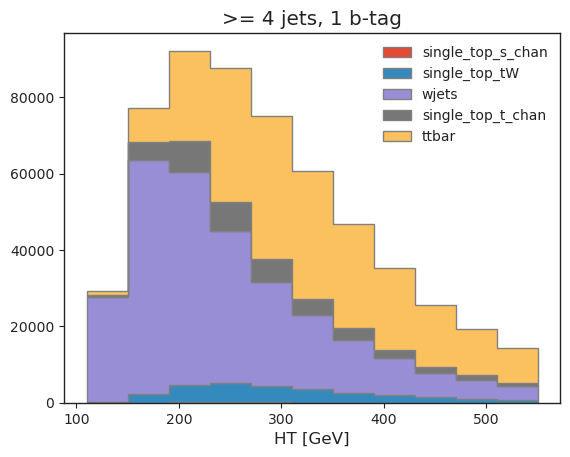
Let’s have a look at the data we obtained. We built histograms in two phase space regions, for multiple physics processes and systematic variations.
[9]:
utils.set_style()

all_histograms[110j::hist.rebin(2), "4j1b", :, "nominal"].stack("process")[::-1].plot(stack=True, histtype="fill", linewidth=1, edgecolor="grey")
plt.legend(frameon=False)
plt.title(">= 4 jets, 1 b-tag")
plt.xlabel("HT [GeV]");
[10]:
all_histograms[:, "4j2b", :, "nominal"].stack("process")[::-1].plot(stack=True, histtype="fill", linewidth=1,edgecolor="grey")
plt.legend(frameon=False)
plt.title(">= 4 jets, >= 2 b-tags")
plt.xlabel("$m_{bjj}$ [Gev]");
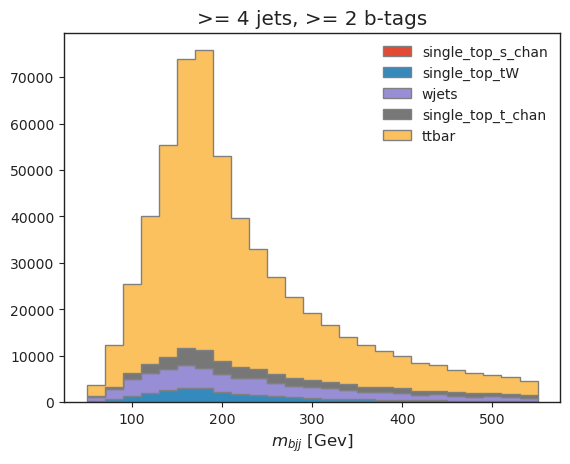
Our top reconstruction approach (\(bjj\) system with largest \(p_T\)) has worked!
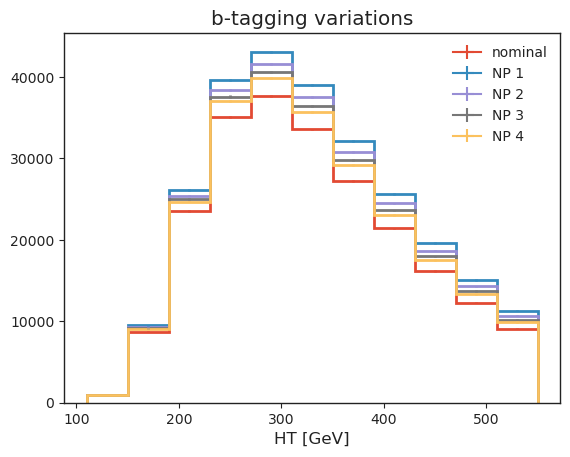
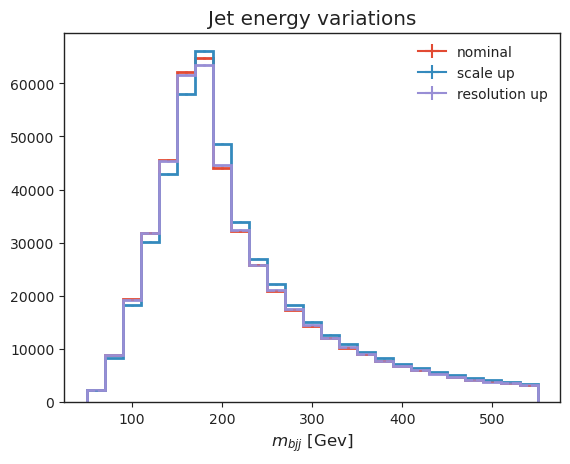
Let’s also have a look at some systematic variations: - b-tagging, which we implemented as jet-kinematic dependent event weights, - jet energy variations, which vary jet kinematics, resulting in acceptance effects and observable changes.
We are making of UHI here to re-bin.
[11]:
# b-tagging variations
all_histograms[110j::hist.rebin(2), "4j1b", "ttbar", "nominal"].plot(label="nominal", linewidth=2)
all_histograms[110j::hist.rebin(2), "4j1b", "ttbar", "btag_var_0_up"].plot(label="NP 1", linewidth=2)
all_histograms[110j::hist.rebin(2), "4j1b", "ttbar", "btag_var_1_up"].plot(label="NP 2", linewidth=2)
all_histograms[110j::hist.rebin(2), "4j1b", "ttbar", "btag_var_2_up"].plot(label="NP 3", linewidth=2)
all_histograms[110j::hist.rebin(2), "4j1b", "ttbar", "btag_var_3_up"].plot(label="NP 4", linewidth=2)
plt.legend(frameon=False)
plt.xlabel("HT [GeV]")
plt.title("b-tagging variations");
[12]:
# jet energy scale variations
all_histograms[:, "4j2b", "ttbar", "nominal"].plot(label="nominal", linewidth=2)
all_histograms[:, "4j2b", "ttbar", "pt_scale_up"].plot(label="scale up", linewidth=2)
all_histograms[:, "4j2b", "ttbar", "pt_res_up"].plot(label="resolution up", linewidth=2)
plt.legend(frameon=False)
plt.xlabel("$m_{bjj}$ [Gev]")
plt.title("Jet energy variations");
Save histograms to disk#
We’ll save everything to disk for subsequent usage. This also builds pseudo-data by combining events from the various simulation setups we have processed.
[13]:
utils.save_histograms(all_histograms, fileset, "histograms.root")
Statistical inference#
We are going to perform a re-binning for the statistical inference. This is planned to be conveniently provided via cabinetry (see cabinetry#412, but in the meantime we can achieve this via template building overrides. The implementation is provided in a function in utils/.
A statistical model has been defined in config.yml, ready to be used with our output. We will use cabinetry to combine all histograms into a pyhf workspace and fit the resulting statistical model to the pseudodata we built.
[14]:
cabinetry_config = cabinetry.configuration.load("cabinetry_config.yml")

# rebinning: lower edge 110 GeV, merge bins 2->1
rebinning_router = utils.get_cabinetry_rebinning_router(cabinetry_config, rebinning=slice(110j, None, hist.rebin(2)))
cabinetry.templates.build(cabinetry_config, router=rebinning_router)
cabinetry.templates.postprocess(cabinetry_config)  # optional post-processing (e.g. smoothing)
ws = cabinetry.workspace.build(cabinetry_config)
cabinetry.workspace.save(ws, "workspace.json")
We can inspect the workspace with pyhf, or use pyhf to perform inference.
[15]:
!pyhf inspect workspace.json | head -n 20
                  Summary
            ------------------
               channels  2
                samples  5
             parameters  14
              modifiers  14

               channels  nbins
             ----------  -----
                4j1b CR   11
                4j2b SR   11

                samples
             ----------
                 W+jets
  single top, s-channel
  single top, t-channel
                     tW
                  ttbar
Let’s try out what we built: the next cell will perform a maximum likelihood fit of our statistical model to the pseudodata we built.
[16]:
model, data = cabinetry.model_utils.model_and_data(ws)
fit_results = cabinetry.fit.fit(model, data)

cabinetry.visualize.pulls(
    fit_results, exclude="ttbar_norm", close_figure=True, save_figure=False
)
[16]:
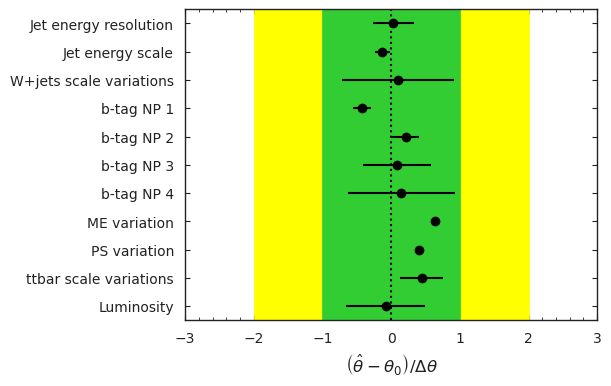
For this pseudodata, what is the resulting ttbar cross-section divided by the Standard Model prediction?
[17]:
poi_index = model.config.poi_index
print(f"\nfit result for ttbar_norm: {fit_results.bestfit[poi_index]:.3f} +/- {fit_results.uncertainty[poi_index]:.3f}")
fit result for ttbar_norm: 0.972 +/- 0.044
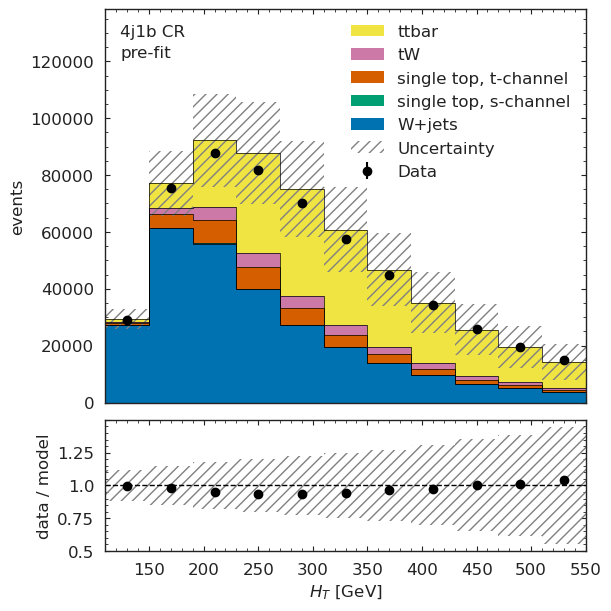
Let’s also visualize the model before and after the fit, in both the regions we are using. The binning here corresponds to the binning used for the fit.
[18]:
model_prediction = cabinetry.model_utils.prediction(model)
figs = cabinetry.visualize.data_mc(model_prediction, data, close_figure=True, config=cabinetry_config)
figs[0]["figure"]
[18]:
[19]:
figs[1]["figure"]
[19]:
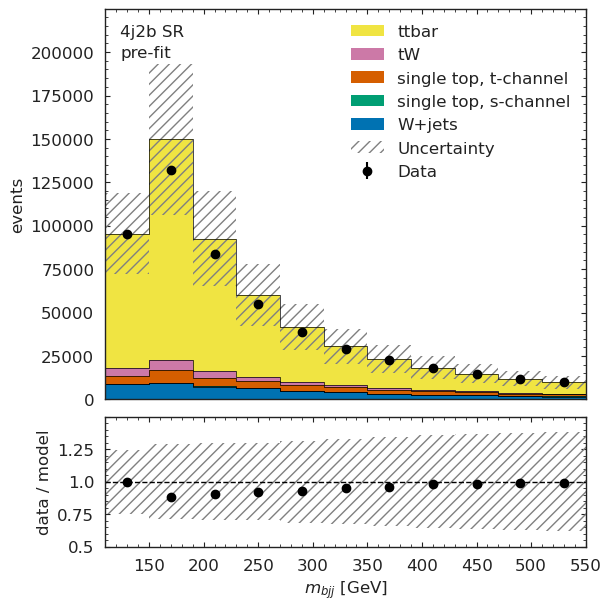
We can see very good post-fit agreement.
[20]:
model_prediction_postfit = cabinetry.model_utils.prediction(model, fit_results=fit_results)
figs = cabinetry.visualize.data_mc(model_prediction_postfit, data, close_figure=True, config=cabinetry_config)
figs[0]["figure"]
[20]:
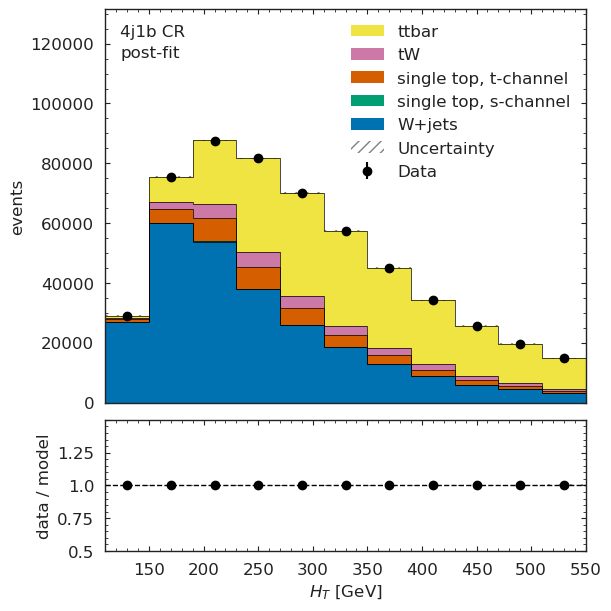
[21]:
figs[1]["figure"]
[21]:
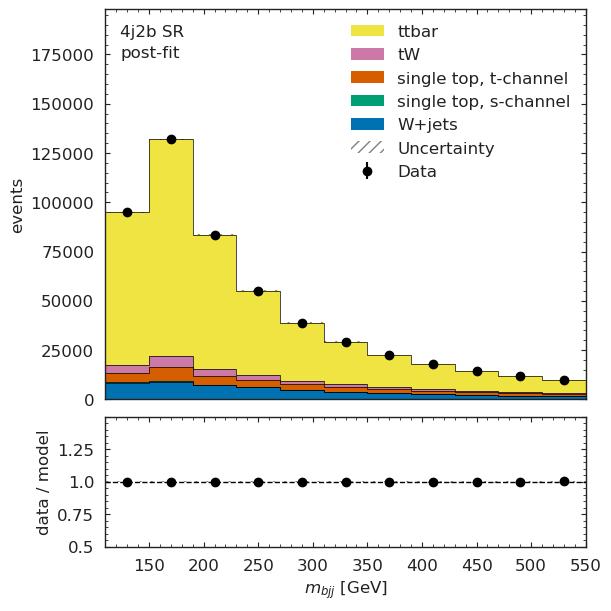
What is next?#
Our next goals for this pipeline demonstration are: - making this analysis even more feature-complete, - addressing performance bottlenecks revealed by this demonstrator, - collaborating with you!
Please do not hesitate to get in touch if you would like to join the effort, or are interested in re-implementing (pieces of) the pipeline with different tools!
Our mailing list is analysis-grand-challenge@iris-hep.org, sign up via the Google group.